


 When the annals of legal technology are someday compiled, the first few days of 2017 will be recorded as the week that a keyboard consumed the legal profession.
Never in my 14 years of blogging and more than two decades of covering legal technology have I seen the legal world react to a new product as it did this week to the LegalBoard, a keyboard designed for lawyers.
Hits to my blog post last week announcing the new keyboard went through the roof, far exceeding any single post I’ve ever published, and continued to do so for several days. Twitter lit up with opinions about the keyboard. Some declared it a brilliant lawyer’s aid. Some declared it an affront to tech-savvy shortcut users. Still others offered their wish lists for keys to add in future versions.
Over the years, I’ve written about any number of weighty legal tech issues – the use of technology to enhance access to justice, the impact of artificial intelligence on law practice, failures in the legal profession to protect confidentiality and security, and the ethical implications of technology competence, among others.
And over the years, I’ve written about any number of product launches, including some that were groundbreaking in establishing a new capability or in defining a new domain of legal technology.
So who’d a thunk it would be a simple keyboard that would so instantly strike the tech nerve of the legal profession?
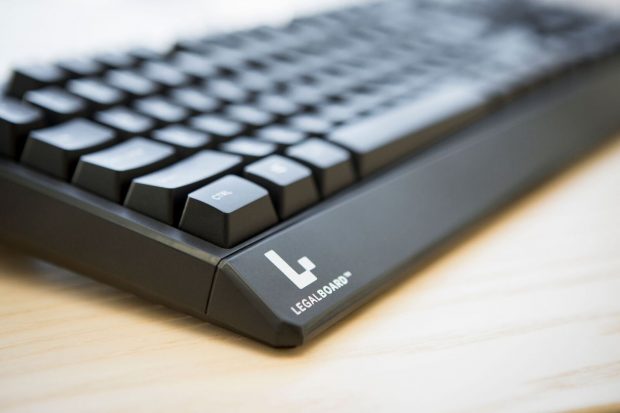
What, you ask, is the cause of this commotion?
Well, it’s a keyboard. It’s not a high-end mechanical keyboard. It’s not a wireless keyboard. It’s not an ergonomic keyboard. It doesn’t do any physical tricks like fold or roll up.
What it does do, however, that no keyboard has ever done before, is have special keys designed specifically for the things that lawyers frequently do when using a keyboard.
[See also my hands-on review of the LegalBoard and a video unboxing.]
It is the brainchild of Brian Potts, a partner at Perkins Coie in Madison, Wisconsin. In an email to me last week, he explained his inspiration:
I was furiously writing a brief when I went to insert a section symbol. As was my custom, I had to stop what I was doing, use the mouse, go to insert a symbol, find the section symbol and hit insert. This process stopped my train of thought, took up my precious time, and more than anything else, was incredibly annoying.
Let me pause here and address all of you tech know-it-alls who are about to turn to Twitter and superciliously ask, “Why buy a special keyboard when you can just hit alt+0167 to insert the section symbol?”
Let’s think about that for a moment. Many lawyers persist in using 12345 as their password because they don’t want to remember number combinations any more complicated than that. Face it, only the geekiest among us are going to commit to memory a list of key+numbers to use as keyboard shortcuts.

What Potts did was to incorporate common lawyerly functions into the keyboard, using the F1 through F12 function keys and the number pad. The keyboard shifts from lawyer mode to standard mode, so the number pad and function keys can function normally whenever the user wants.
On the LegalBoard, the function keys – the F1 through F12 keys at the top of the keyboard – insert these common words and abbreviations: see, e.g., U.S., F.3d, F.2d, F. Supp., U.S.C., C.F.R., plaintiff, defendant, appellant, and respondent.
Four of the number keys also insert words: supreme court, court of appeals, court, and id.
If you press shift while pressing a word key, the word is capitalized. So if I press F11, I get appellant, but if I press shift+F11, I get Appellant.
Three number keys insert symbols. The available symbols are: §, ¶ and ©.
The remaining number keys perform functions. You can use them to:
- Insert bullets.
- Turn small caps on and off.
- Start or close the find window.
- Add a footnote or return to the text from a footnote.
- Add a comment or return to the text from a comment.
- Turn Track Changes on and off.
- Change line spacing from single to 1.5 to double.
- Turn the keyboard’s legal functions on and off.
Additional keys situated between the alpha and numeric keys allow you to format text as italics, underlined or bold.
I received a free review unit on Friday and drafted this post in Word using the LegalBoard. Many of its functions also work in other Microsoft Office products, including Outlook and PowerPoint. The keyboard is comfortable to use and I can see its appeal for anyone who regularly writes legal memoranda and briefs.
If you are interested, it costs $65 and can be purchased here.
Does the legal profession really need a keyboard of its own? Of course not. But judging by the reaction this week, need isn’t the issue, it is want. Clearly, a whole lot of legal professionals want this keyboard.
Robert Ambrogi is a Massachusetts lawyer and journalist who has been covering legal technology and the web for more than 20 years, primarily through his blog LawSites.com. Former editor-in-chief of several legal newspapers, he is a fellow of the College of Law Practice Management and an inaugural Fastcase 50 honoree. He can be reached by email at [email protected], and you can follow him on Twitter (@BobAmbrogi).


